All the tools in the system
A real view of the system
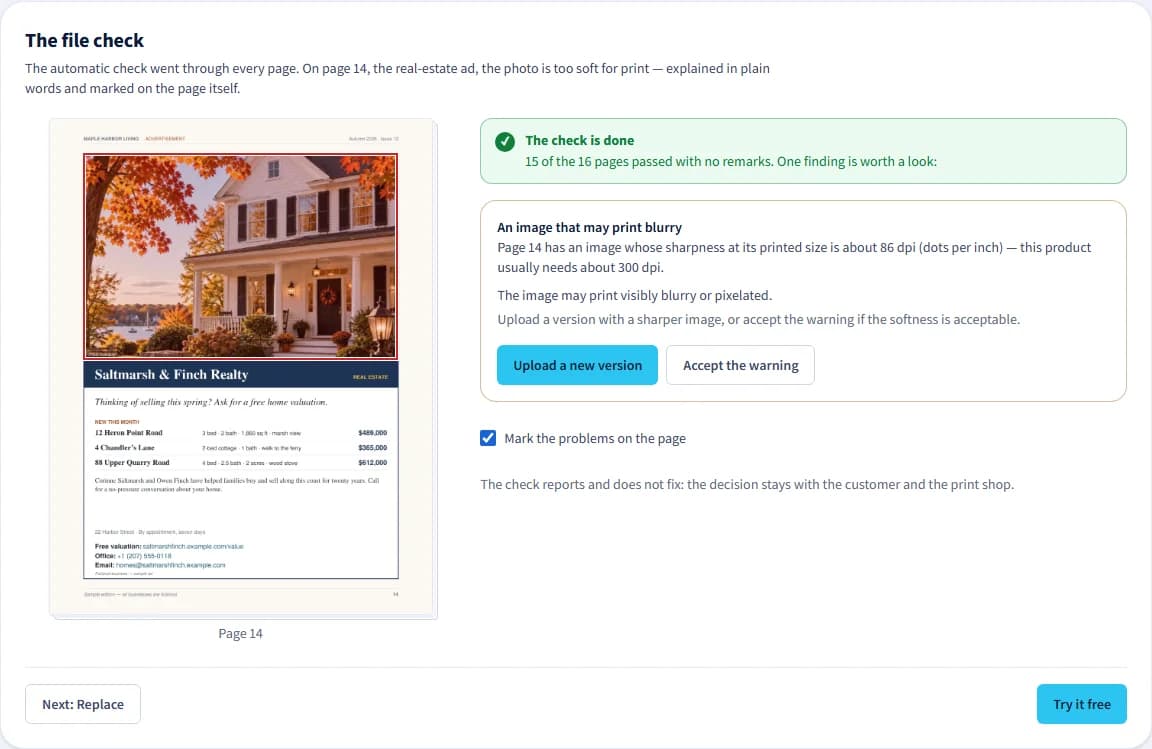
Keep file-check findings and the job’s state together in one place.
For print shops
Order queue and daily agenda
All jobs in one place, urgent ones first.
Production board
Who is working on what and at which stage, with an update to the customer.
Workstation at the machine
Start, finish and fault reporting, also from a phone and by scanning a QR code.
Job tickets
Stages, machines and sign-offs for every approved job.
Combined sheets
Several flat jobs from several orders on one sheet, by share of the sheet and close quantities.
File check
Page structure, size, bleed, font embedding, resolution, spot colors, color space (RGB), rich black text, overprint and transparency. The check reports and does not fix.
Page board and page actions
Replacing and arranging pages, rotation, splitting spreads, mirror bleed and scaling.
Automatic fixes on the page board
Bleed, page size, orientation, split spreads, compression and flattening a page into one image — flattening always asks for an explicit confirmation first. Replacing missing fonts with matching free ones is done by the print shop’s staff, not by the customer. You see what will change before you confirm, and you can always go back to the original.
Versions and locked approval
The original is always kept, and the approval is locked to the exact version.
Proof by product
Flip-through for booklets, front and back, single flat surface and fold.
A job package for prepress, with drag-to-folder or download
A branded store at your own address
Color, logo and a product catalog.
Customer designs
A design library for each customer, notes, a specification and price for the customer, and repeat orders from a saved design.
Importing customers and design folders
Links to send files
A personal or general link where a customer who has not signed up sends files, the product and the quantity.
Recurring issues
Numbered issues, collecting pages and final proof approval.
Print request network
Receiving matching requests and sending quotes.
Bids and print opportunities
Print work from public sources. The names, the details and the bid tools are open in the first week of the trial and with a paid subscription.
Ad desk
Advertising orders, materials and placement in issues. A module the shop can choose.
Team and permissions
Five roles.
Notifications
Email, the bell and phone notifications.
Reports
Handling times and jobs that are waiting.
An app to install on your phone
Pricing and quote tools
A price list for each kind of printing — offset, digital and wide format — with components, versions, a history of quotes, a sheet recommendation, and pricing a network request by your own list.
The digital booklet
A link for reading and sharing an approved issue, with a way through to the title’s previous issues.
For customers
Customer portal
Orders, a design library and tracking.
The business’s team
The business admin invites employees and decides what each may do, and every order shows who placed it.
Online ordering at an agreed price, or a quote request
Uploading files, arranging pages and approving the proof in plain words
Comments on the proof’s pages
A pin, a box or a highlight on the page itself, with replies from both sides until the comment is resolved.
Requesting quotes from print shops in the network, and ordering directly from a price list
A rendering of the finished product
Drapress Studio
Preparing a design on your own.
For designers
An account without a print shop
Send a request, compare quotes and choose, and continue with the file at the chosen print shop.